iPhone 14 Plus Overheating After Battery Replacement
Diagnosing Secondary Damage: Proximity Flex, Screw Misplacement & Charging Coil Tears
You replaced the battery in your iPhone 14 Plus, but now the phone runs dangerously hot — and the heat isn't coming from the battery. It's radiating from the logic board area. This is one of the most misdiagnosed post-repair symptoms in the iPhone 14 series. The battery itself is almost never the culprit. Instead, the heat is a distress signal from secondary damage caused during the repair. Based on verified cases from iFixit, Reddit r/Iphonerepair, and Apple Community, we've identified three high-probability causes and a five-step diagnostic flowchart to help you pinpoint the exact failure.
SECONDARY REPAIR DAMAGE
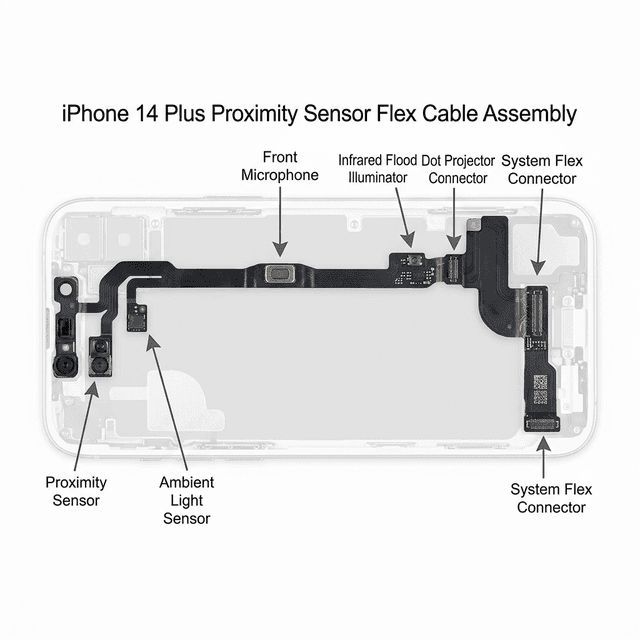
Proximity Sensor Flex Cable Inspection & Replacement
Confidence: High — In the majority of post-battery-swap overheating cases on iPhone 14 Plus, the heat source is the logic board, not the battery. The three highest-probability causes are: (1) proximity sensor flex damage, (2) misplaced screws creating a short circuit, and (3) a torn charging coil flex. All are induced by the repair process, not pre-existing hardware failure.. Use our diagnosis tool
Why Does the Logic Board Overheat After a Battery Swap?
The iPhone 14 Plus logic board operates on a finely balanced power distribution network centered around the PP_VDD_MAIN rail — the primary voltage line that feeds most of the board's subsystems. When the proximity sensor flex cable (which runs along the top of the display assembly and integrates the ambient light sensor, distance sensor, and front microphone) sustains a nick or partial short during battery removal or reassembly, it creates an uncontrolled current path that forces PP_VDD_MAIN to continuously source excess current. The PMIC (Power Management IC) cannot throttle this load, so it dissipates the excess energy as heat concentrated at the sensor connector on the board. Screw misplacement creates a different but equally damaging problem. The iPhone 14 Plus uses a mixture of pentalobe screws for the outer case and Phillips screws for internal shields. If even a single Battery Connector Shield screw is placed into an adjacent hole — one that sits over an active trace — it bridges two voltage domains and causes a hard short. Users typically report a very specific thermal signature: intense, pinpoint heat at the top-left corner of the board, near the EMI shield. Finally, the iPhone 14 series introduced a delicate charging coil flex that runs along the right edge of the device. iFixit explicitly warns that pick insertion deeper than 3mm on the right side risks puncturing this ribbon. A damaged coil flex creates a partially shorted antenna or charging path, increasing current draw and producing localized heat at the charging port area — most noticeable during wireless or wired charging.
MATCHED EVIDENCE FROM SYMPTOM CHECK
5-Step Diagnostic Flowchart
Unlike software-triggered restarts, post-repair thermal failures do not generate standard iOS panic logs. Instead, follow this hardware-level triage sequence: re-open the device and systematically inspect each risk zone. Do not attempt to use the device while it overheats as sustained thermal stress can cause permanent NAND or PMIC damage.
Step 1: Locate the heat source
  ├─ Upper-left board area → Inspect proximity flex / screw placement
  ├─ Right-edge / charging port → Inspect charging coil flex
  └─ Battery area → Inspect battery seating & connector lock

Step 2: Re-check all screws against iFixit screw map
  └─ Verify Battery Connector Shield screws are in correct holes

Step 3: Inspect all flex cable connections
  ├─ Battery connector (fully locked?)
  ├─ Charging coil flex (any visible tears on right edge?)
  └─ Proximity sensor flex (visible nicks near earpiece?)

Step 4: Test with known-good battery
  └─ Reinstall original battery — does overheating persist?

Step 5: Board-level check (professional shop)
  └─ Measure PP_VDD_MAIN current draw — normal idle < 150mA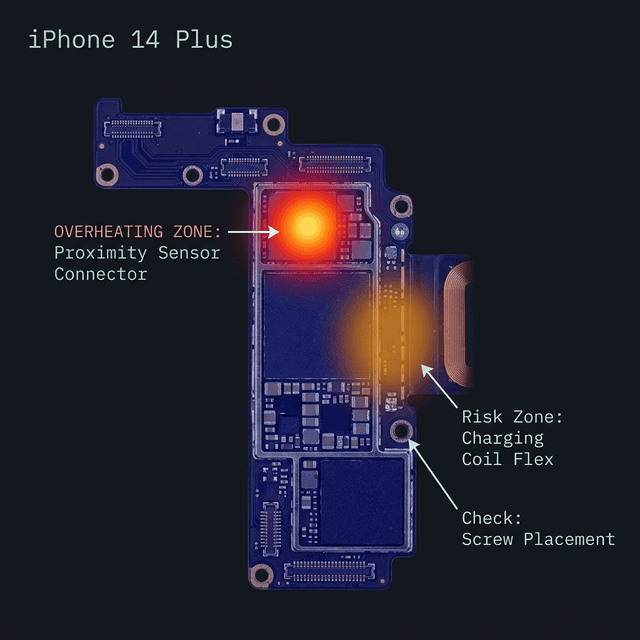
How to Fix Post-Battery-Replacement Overheating
For the majority of cases, the fix is to re-open the device and correct the specific damage found during the five-step diagnostic above. If the proximity sensor flex cable is torn or shows continuity to ground where it shouldn't, it must be replaced. If a screw was misplaced, return it to the correct position — the overheating typically resolves the moment the short is cleared, without any additional parts. For a torn charging coil flex, the right-edge ribbon requires full replacement. Note: On the iPhone 14 Plus, the proximity sensor flex does NOT pair to Face ID (Face ID is on a separate TrueDepth camera module). You can replace the proximity flex without losing Face ID, but ensure you use an OEM-grade part to maintain True Tone and ambient light calibration.
Want a More Precise Diagnosis?
Use our interactive diagnostic tool to narrow down your device's issues. By answering a few specific questions, we'll help pinpoint the exact failure point.
START FULL DIAGNOSISOther Possible Causes
WHILE LESS LIKELY, THESE ISSUES COULD ALSO CAUSE SIMILAR SYMPTOMS